we will be introducing nginx now, as a reverse proxy (acts on behalf of servers to field incoming client requests securely)
imma keep the name of the approaches simple
- Nginx Reverse Proxy
- Nginx Reverse Proxy With Cache
- X-Accel-Redirect
we will be seeing an extra file, nginx.conf and some code changes in the application server.
Let’s start then
Implementations
Nginx Reverse Proxy (branch: nginx_reverse_proxy)
The Provider and the Delivery Will still remain with our minio-instance.
If you remember in our Public Minio storage and delivery (branch: public_minio_hls), we directly access the video from the minio’s playbackURL. eg: http://minio:9000/storage/video/...../object_key.m3u8
Our storage bucket will be
publicin this impl
It will be the same here, but instead the client makes a request to the nginx URI path. Nginx will fetch the video requested resource for you from our minio-instance.
lets take a look at the nginx config nginx.conf
Nginx Configuration file
in: nginx/nginx.conf
events {}

http {
    server{
        listen 80;
        client_max_body_size 500M;
        location /api/videos {
            proxy_pass http://backend:8080;
            proxy_set_header HOST $host;
            proxy_set_header X-Real-IP $remote_addr;

            proxy_read_timeout 600s;
            proxy_send_timeout 600s;
        }

        location /media/ {
            proxy_pass http://minio:9000/;
        }
    }
}
Docker Compose file
services:
  minio:
    image: quay.io/minio/minio
    container_name: minio
    restart: always
    # Expose these ports during local development/debugging.
    # In a typical production deployment MinIO lives on a private network
    # and is accessed only by trusted services (Nginx, backend, workers, etc).
    # The MinIO Console (9001) is almost never exposed publicly.
    # The S3 API port (9000) may be exposed if MinIO is being used as the
    # public delivery layer, but is commonly hidden behind Nginx, a CDN,
    # or another gateway. [comment- written by AI]
    # ports:
      # - "9000:9000"
      # - "9001:9001"
    environment:
      MINIO_ROOT_USER: adminpass
      MINIO_ROOT_PASSWORD: adminpass
    command: server --console-address ":9001" /data
    volumes:
      - ~/minio-data:/data
  nginx:
    image: nginx:latest
    ports:
      - "8080:80"
    volumes:
      - ./nginx/nginx.conf:/etc/nginx/nginx.conf
    depends_on:
      - backend
      - minio
  backend:
    build:
      context: .
      dockerfile: internal/Dockerfile
    depends_on:
      - minio
- any request that matches the uri path -
/api/videoswill be proxied by nginx to our backend - without stripping the matched prefix:
1. Request url by client: POST `http://localhost:8080/api/videos/.....`

2. Nginx matches the incoming request URI with `/api/videos/` and proxies to our backend on behalf of the client

3. Request made to our application server by nginx: POST `http://backend:8080/api/videos/....`
- any request that matches the uri path -
/media/will be proxied by nginx to our minio-instance- by stripping the matched prefix
Request Lifecycle
- video bytes never touches our application server.
Working
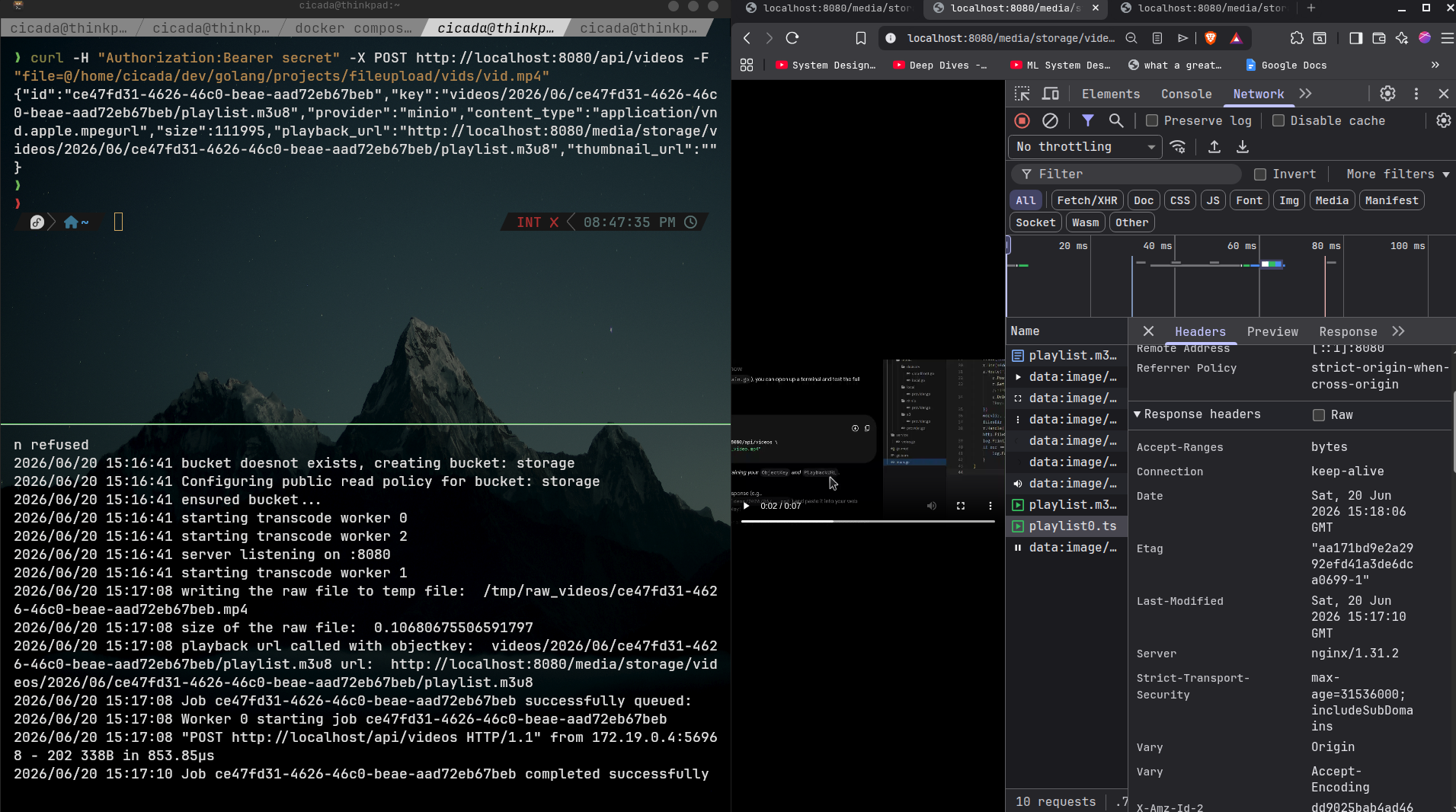
- run:
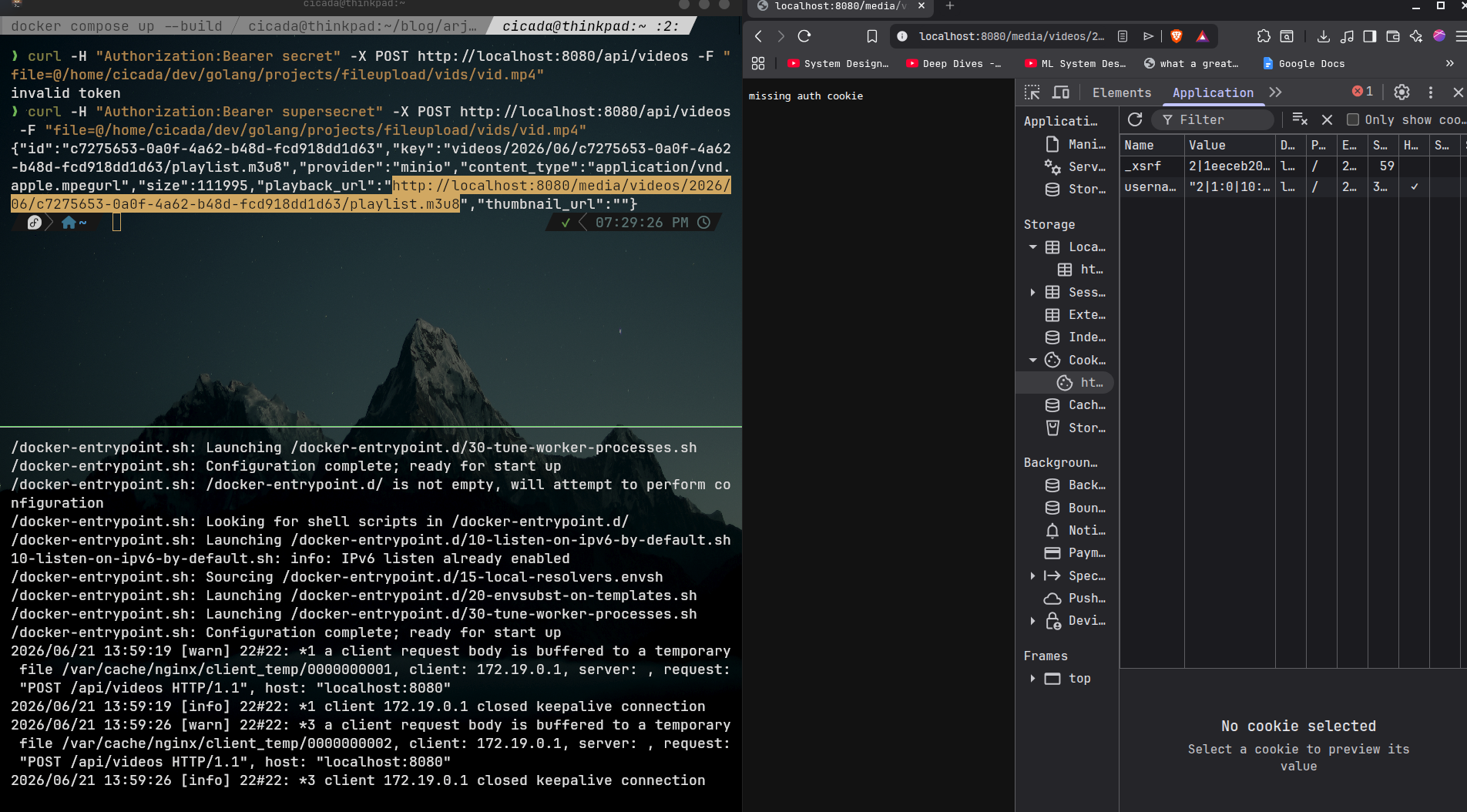
docker compose up --build curl -H "Authorization:Bearer secret" -X POST http://localhost:8080/api/videos -F "file=@/path/to/you/video.mp4"- i have implemented a simple middle to mimic authentication which i will cover in the last part when we get to cookie for video-access.
notice the server as `nginx:1.31.2` from our response headers in for the request to `playlist0.ts` - reverse proxy in action
Nginx Reverse Proxy Cache (branch: nginx_reverse_proxy_cache)
docker files,provider,delivery- all else remain the same except fornginx.conf
The only change for this implementation will be with the file nginx/nginx.conf
here is the configuration file
events {}


http {
    log_format cachelog
    '$remote_addr '
    '$request_uri '
    '$status '
    '$upstream_cache_status';

    access_log /var/log/nginx/cache.log cachelog;


    proxy_cache_path /var/cache/nginx/hls_cache
        levels=1:2
        keys_zone=hls_cache:20m
        max_size=50g
        inactive=24h
        use_temp_path=off;


    server{
        listen 80;
        client_max_body_size 500M;

        location / {
            proxy_pass http://backend:8080/;
        }

        location /api/videos {

            proxy_pass http://backend:8080;
            proxy_set_header HOST $host;
            proxy_set_header X-Real-IP $remote_addr;

            proxy_read_timeout 600s;
            proxy_send_timeout 600s;

        }


        location /media/ {

            proxy_cache hls_cache;

            proxy_cache_key "$scheme$proxy_host$request_uri";

            proxy_ignore_headers Cache-Control Expires Set-Cookie;

            proxy_cache_valid 200 24h;
            proxy_cache_valid 206 24h;

            proxy_cache_use_stale
                error
                timeout
                http_500
                http_502
                http_503
                http_504;

            proxy_cache_background_update on;
            proxy_cache_lock on;
            proxy_cache_lock_timeout 10s;

            proxy_force_ranges on;

            add_header X-Cache-Status $upstream_cache_status always;

            proxy_pass http://minio:9000/;
        }

    }
}
Request Lifecycle
- when the requested object/resource results in a cache miss , nginx will proxy the request to minio-instance and fetch from the source (minio)
- on proxying response to the client nginx caches the response data.
- in the diagram , in
deliverythegreen linesshow acache hitandred linesshow acache miss
Working
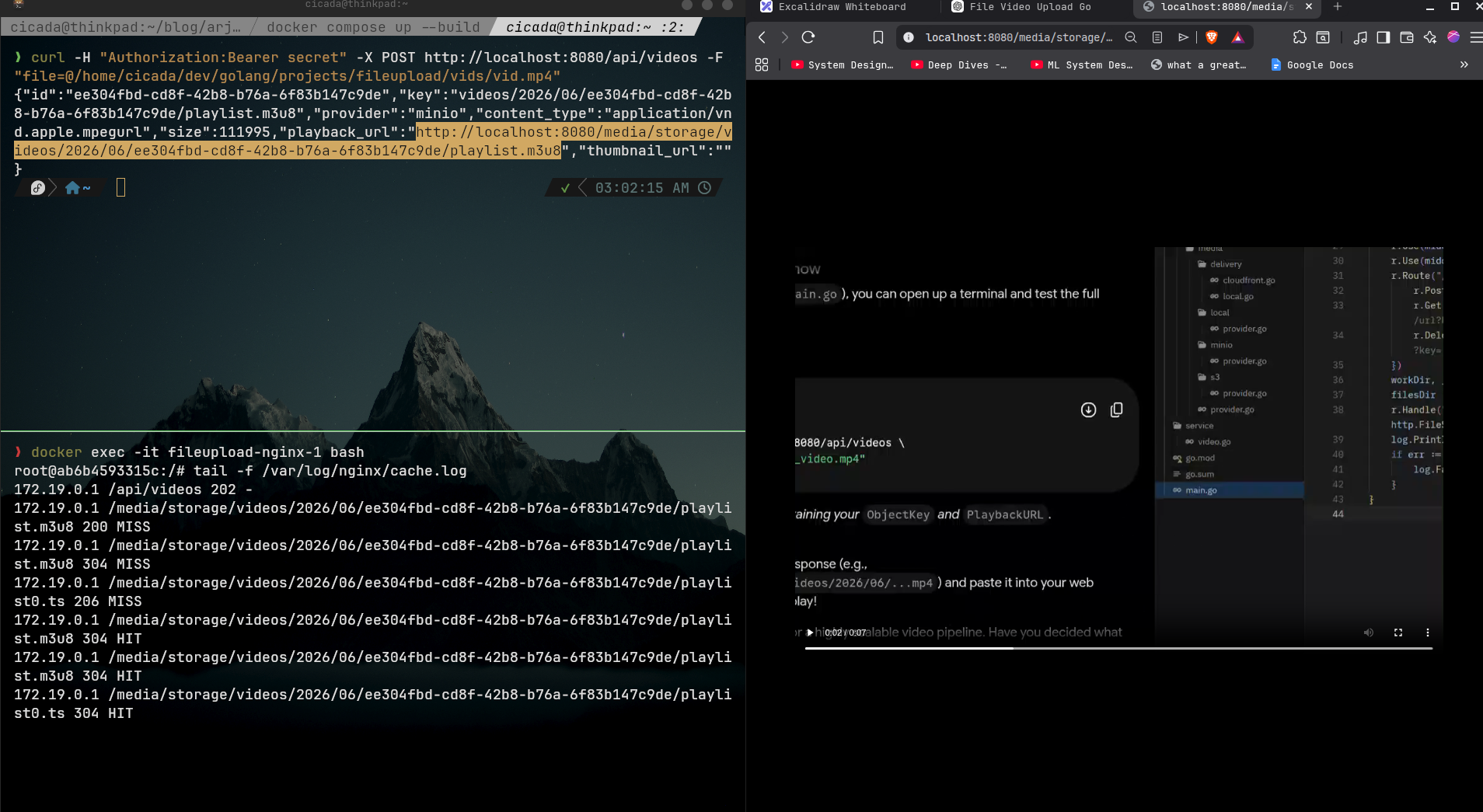
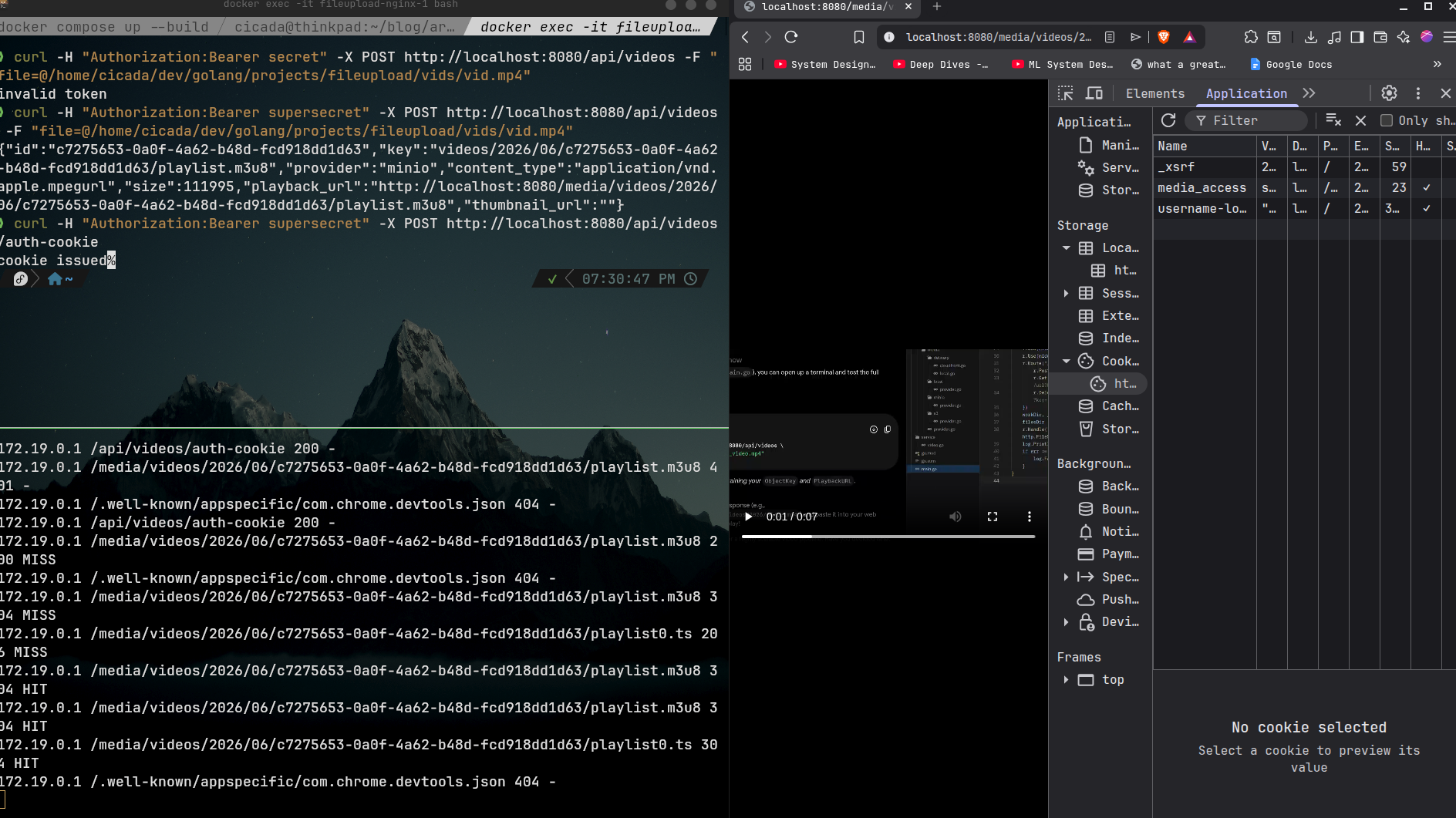
- observe the first request log - it’s a cache
MISS - now when i refreshed the page, essentially requesting the same resource again (manifest and video segements) - it’s a cache
HIT. hence proxy cache in action
X-Accel-Redirect (branch: x_accel_redirect)
Provider , Delivery
- the provider and delivery will remain the same
Nginx Configuration
events {}

http {
    log_format cachelog
    '$remote_addr '
    '$request_uri '
    '$status '
    '$upstream_cache_status';

    access_log /var/log/nginx/cache.log cachelog;

    error_log /var/log/nginx/error.log debug;

    proxy_cache_path /var/cache/nginx/hls_cache
        levels=1:2
        keys_zone=hls_cache:20m
        max_size=50g
        inactive=24h
        use_temp_path=off;


    server{
        listen 80;
        client_max_body_size 500M;

        location / {
            proxy_pass http://backend:8080/;
        }

        location /api/videos {

            proxy_pass http://backend:8080;
            proxy_set_header HOST $host;
            proxy_set_header X-Real-IP $remote_addr;

            proxy_read_timeout 600s;
            proxy_send_timeout 600s;

        }

        location /media/{
        # this will be a validating/auth backend now
        # responds with x-accel-redirect header for nginx to know
        # that the request is valid and it can serve the file
            proxy_pass http://backend:8080;
            proxy_set_header Host $host;
            proxy_set_header X-Real-IP $remote_addr;
        }

        location /_protected/ {

            internal;

            proxy_cache hls_cache;

            proxy_cache_key "$scheme$proxy_host$uri";

            proxy_ignore_headers Cache-Control Expires Set-Cookie;

            proxy_cache_valid 200 24h;
            proxy_cache_valid 206 24h;

            proxy_cache_use_stale
                error
                timeout
                http_500
                http_502
                http_503
                http_504;

            proxy_cache_background_update on;
            proxy_cache_lock on;
            proxy_cache_lock_timeout 10s;

            proxy_force_ranges on;

            add_header X-Cache-Status $upstream_cache_status always;
            add_header X-Debug-Uri $uri always;


            proxy_pass http://minio:9000/;
        }

    }
}
Middleware
we will introduce authentication middleware.
in file: internal/middleware/auth.go
package middleware

import (
	"encoding/json"
	"maps"
	"net/http"
	"strings"
)

func writeJson(w http.ResponseWriter, status int, data any, headers http.Header) error {
	js, err := json.Marshal(data)
	if err != nil {
		return err
	}
	js = append(js, '\n')
	maps.Copy(w.Header(), headers)
	w.Header().Set("Content-Type", "application/json")
	w.WriteHeader(status)
	w.Write(js)
	return nil
}

func TokenAuthenticate(next http.Handler) http.Handler {
	return http.HandlerFunc(func(w http.ResponseWriter, r *http.Request) {
		authHeader := r.Header.Get("Authorization")
		parts := strings.SplitN(authHeader, " ", 2)
		if len(parts) != 2 {
			http.Error(w, "missing auth header", http.StatusUnauthorized)
			return
		}

		if parts[0] != "Bearer" {
			http.Error(w, "invalid auth scheme", http.StatusUnauthorized)
			return
		}

		if parts[1] != "supersecret" {
			http.Error(w, "invalid token", http.StatusUnauthorized)
			return
		}
		next.ServeHTTP(w, r)
	})
}

func CookieAuthenticate(next http.Handler) http.Handler {
	return http.HandlerFunc(func(w http.ResponseWriter, r *http.Request) {
		// Read token from cookie
		cookie, err := r.Cookie("media_access")
		if err != nil {
			http.Error(w, "missing auth cookie", http.StatusUnauthorized)
			return
		}

		if cookie.Value != "supersecret" {
			http.Error(w, "invalid token in cookie", http.StatusUnauthorized)
			return
		}

		next.ServeHTTP(w, r)
	})
}
we will look at the explanation and usage of these in our server code
Server
lets change see how integrate the middleware and scoped authentication in our application server
	r := chi.NewRouter()
	r.Use(middleware.Logger)
	r.Use(middleware.Recoverer)
	r.Get("/health", func(w http.ResponseWriter, r *http.Request) {
		w.WriteHeader(http.StatusOK)
		w.Write([]byte("alive\n"))
	})
	//our video delivery access will be a cookie-based authentication
	r.With(routingmiddleware.CookieAuthenticate).Handle("/media/*", &handlers.RedirectHandler{
		BucketName: bucketName,
	})
	//and our core application server routes will be token(jwt) based authentication
	r.Route("/api/videos", func(r chi.Router) {
		r.Use(routingmiddleware.TokenAuthenticate)
		r.Post("/auth-cookie", videoHandler.GetAuthCookie)
		r.Post("/", videoHandler.Upload)   // POST /api/videos
		r.Get("/url", videoHandler.GetURL) // GET /api/videos/url?key=...
		r.Delete("/", videoHandler.Delete) // DELETE /api/videos?key=...
	})
	server := &http.Server{
		Addr:    ":8080",
		Handler: r,
	}
in a production implementation, the flow will ideally looks like this
The goal of this approach is to keep media assets private while ensuring that the Go application is responsible only for authorization, not for serving video bytes.
Authentication Flow
- The client authenticates using their email and password. (we have skipped this part)
- The backend issues a signed JWT access token.
Media Access Cookie Procuring Flow
- The client exchanges this token for a short-lived, scoped cookie that grants access to video content.
- The browser automatically sends this cookie with every HLS request (
.m3u8playlists and.tssegments).
Client
    ↓
POST /api/videos/auth-cookie
Authorization: Bearer <jwt>
    ↓
Go Application
    ↓
Set-Cookie: media_access=<signed-cookie>
Media Request Flow
Client
    ↓
GET /media/.../playlist.m3u8
    ↓
CookieAuthenticate Middleware
    ↓
RedirectHandler
    ↓
X-Accel-Redirect: /_protected/videos/...
    ↓
Nginx Internal Redirect: http://mini:900/videos/...
    ↓
  MinIO
    ↓
  Nginx
    ↓
  Client
The Go application:
- Validates the scoped media cookie.
- Verifies that the user is authorized to access the requested resource.
- Returns a successful response containing an
X-Accel-Redirectheader pointing to the internal media location.
Example:
HTTP/1.1 200 OK
X-Accel-Redirect: /_protected/videos/.../playlist.m3u8
Internal Media Delivery
Nginx is configured with an internal-only location block:
location /_protected/ {
    internal;
    # all the caching related stuff
    proxy_pass http://minio:9000/;
}
Because the location is marked as internal, clients cannot access it directly.
After receiving the X-Accel-Redirect header, Nginx:
- Performs an internal redirect to the protected location.
- Fetches the requested object from MinIO.
- Streams the response back to the client.
Tradeoffs
- Media objects remain private in storage.
- Clients never learn the underlying MinIO object URLs.
- Authorization logic stays centralized in the Go application.
- Video bytes never flow through the application server.
- Nginx handles streaming, buffering, range requests, and caching efficiently.
- Easy migration path to signed URLs, signed cookies, or CDN-based delivery in the future.
Request Lifecycle
Working
- no video will be streamed without media_access cookie
after cookie is issued, client can access the resource
Closing
That sums up all the implementations. We will look at core architectural changes in the next blogs